
Guides
Figma AI Credits, Explained: What They Are, How Many You Get, What Every Feature Costs, Why Figma Make Burns Through Them, How to See Who's Spending, and How to Buy More Without Getting Surprised
By the Top5Apps editorial team · Published October 24, 2026 · Updated October 24, 2026 · 15 min read
Short answer: Figma AI credits are a single meter that every AI feature in Figma draws from. Each seat gets a fixed monthly amount that belongs to that person alone, resets monthly, doesn't roll over, and can't be shared: 3,000 a month on a Professional Full seat, 3,500 on Organization, 4,250 on Enterprise, and 500 on every Dev, Collab, View, or Starter seat (Starter and View also cap at 150 a day). Simple actions have fixed prices (removing a background is 1 to 5 credits, generating an image is 2 to 16 depending on the model). Figma Make, the Figma agent, Specs, and code layers are 'variable': the AI decides how much work to do, Figma can't tell you the price in advance, and a single prompt can cost 30 credits or 300. When someone runs out, their seat credits are gone until reset, and the only other source is paid credits an admin buys for the whole team, either a monthly subscription package or pay-as-you-go up to a spend limit, at a per-credit price Figma shows only in the admin dashboard (staff quoted $0.03 a credit for pay-as-you-go in May 2026). That is the entire system. The confusion comes from four places: the two kinds of credits behave differently, the variable-cost features have no price tag, included seat credits can't be moved to the person who needs them, and the rules have changed five times since July 2025. Each of those is below, with our own team's October as the example.
What are Figma AI credits, exactly?
Figma's definition, from How Figma AI credits work: 'AI credits are used to run AI actions in Figma, including tools like Figma Make, AI image editing, and AI-powered workflows across the platform.' There are two kinds, and almost every surprise comes from not knowing which one you're spending.
- Seat credits. Included with every seat on every plan. Figma's own list: they 'are assigned to an individual user,' 'reset monthly,' 'don't roll over,' and 'can't be shared or transferred to other users.' If you have 3,000 and your teammate has 3,000, that is not 6,000 for the team; it's two separate 3,000s, and the unused ones expire.
- Paid credits. Bought by an admin, on paid plans only, and 'pooled at the plan level,' meaning everyone on the plan can draw from them (unless the admin limits who can). They come in two forms: a monthly subscription package, or pay-as-you-go billing capped by a monthly spending limit.
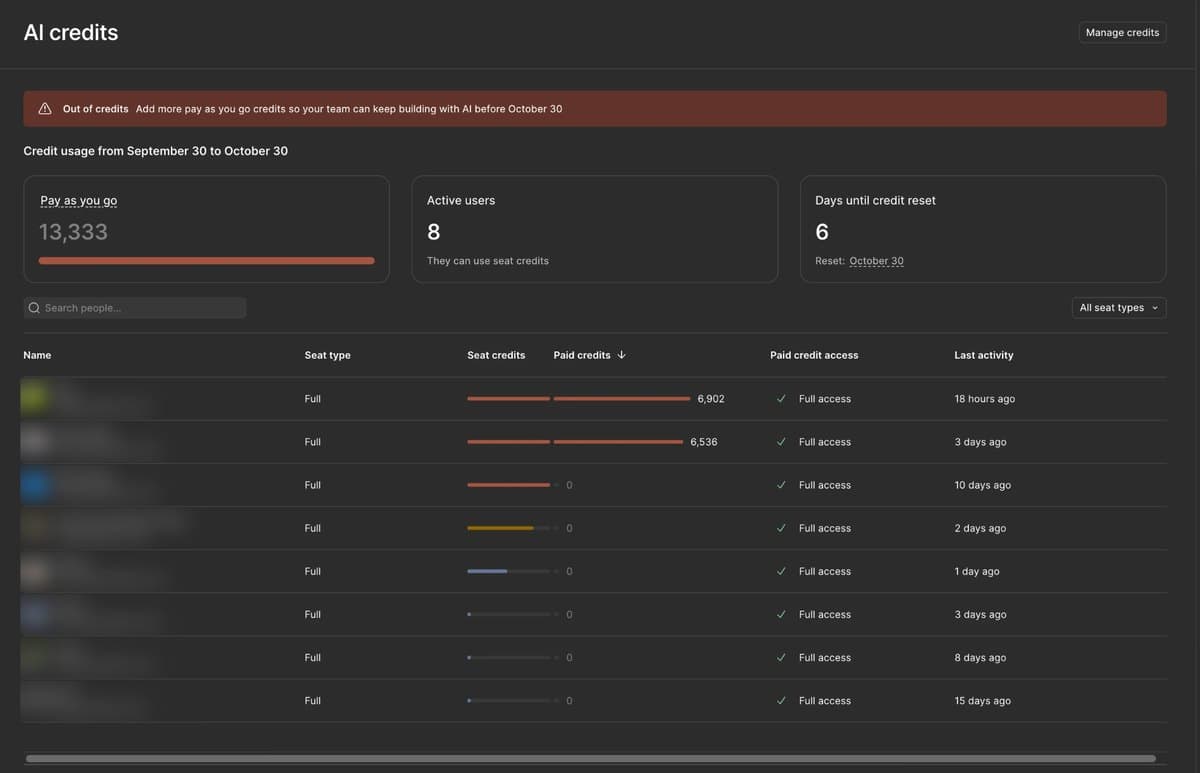
- The order they're spent in, from Manage AI credits: 'Seat credits are always used first,' then shared subscription credits, then pay-as-you-go. So a person's paid-credit usage only starts after their own seat credits hit zero, which is why a dashboard can show two people with huge paid numbers and six with none.
- Credits are per plan, not per person. 'Users with multiple plans will have separate credit allocations for each plan, and those credits don't combine or stack.' If you're on your company's Organization plan and also run a personal Professional team, those are two meters.
- They aren't money. Figma's AI Credit Terms (effective March 11, 2026): credits 'do not represent legal tender, currency, or stored value, and are not redeemable for monetary value,' and they 'expire at the end of each month and do not rollover.'
How many credits does each plan and seat get?
| Seat | Starter (free) | Professional | Organization | Enterprise |
|---|---|---|---|---|
| Full seat | 500 / month, 150 / day cap | 3,000 / month | 3,500 / month | 4,250 / month |
| Dev seat | — | 500 / month | 500 / month | 500 / month |
| Collab seat | — | 500 / month | 500 / month | 500 / month |
| View (free viewer on a paid plan) | — | 500 / month, 150 / day cap | 500 / month, 150 / day cap | 500 / month, 150 / day cap |
| Seat price (annual billing) | $0 | Full $16, Dev $12, Collab $3 | Full $55, Dev $25, Collab $5 | Full $90, Dev $35, Collab $5 |
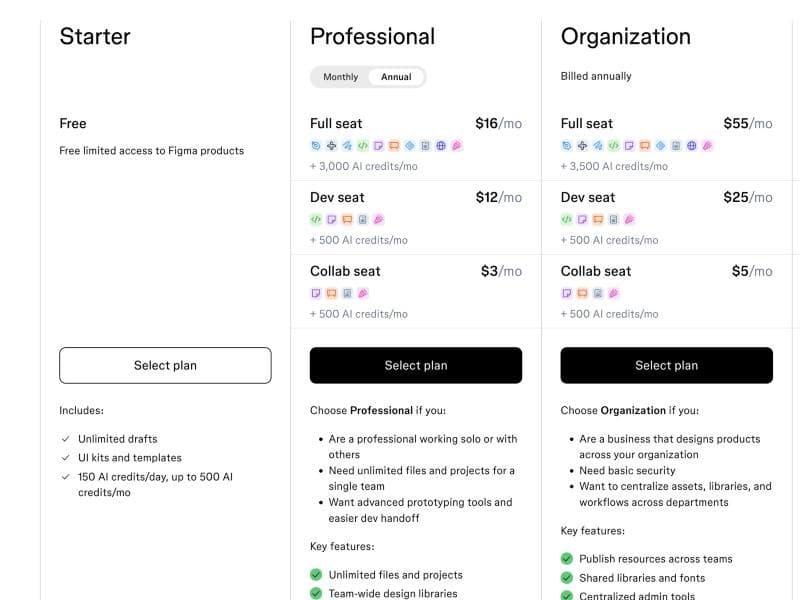
Two more plans: Education gets 3,000 a month per user, and Figma for Government gets the Enterprise numbers but, per its help page, Full-seat limits 'are not strictly enforced' there yet and 'additional AI credits are not available for purchase at this time.' One inconsistency to know about: the pricing cards say Starter is '150 AI credits/day, up to 500 AI credits/mo,' while the FAQ on the same page says Starter users 'receive 500 credits/month' with no mention of the daily cap. The help center sides with the cards: Starter and View seats have both limits. When do they reset? 'Credits reset automatically. Full, Collab, and Dev seats reset monthly.' Figma doesn't say whether that's your billing date or the calendar month; our dashboard's cycle runs September 30 to October 30, which lines up with the plan's billing date, and the AI balance menu shows each user their own reset date. Figma's July 2025 rule of thumb, still the only official translation of credits into prompts, was that 3,000 credits is 'about 50-70 Make prompts.' Hold that number; it is optimistic for how people actually use Make.
What uses credits, and how many does each thing cost?
Figma publishes a consumption table, 'as of October 15, 2026,' and promises to add features 'once they have an associated cost.' Here it is, grouped by how predictable the price is.
| Feature | Credits | Notes |
|---|---|---|
| AI search; Rename layers; Summarize, Cluster, Update visual (FigJam) | Free | Listed as free in the current table |
| Error correction (Auto fix, Fix for me) | Free | 'Do not use additional AI credits' |
| Remove background | 1–5 per image | Fixed range |
| Vectorize image | 2–5 | Fixed range |
| Boost resolution; Erase, Isolate, or Expand object | 5–10 each | Fixed range |
| Make image / Edit image | 2 (ChatGPT Images 2.0), 6 (Nano Banana 2 Lite), 8 (Nano Banana), 16 (Nano Banana 2) per image | Price depends on the image model you pick |
| Generate templates and diagrams (FigJam) | 2–24 per prompt | Fixed range |
| Add interactions (prototyping) | 20 per use | Fixed |
| Weave tools inside Figma Design | 13–110 per run, fixed per tool | e.g. Image to vector 13, Replace background 19, Apply color palette 37, Sticker pack 78, Generate product variations 110; billed since Oct 6, 2026 |
| Figma Make | Variable: 'approximately 30+' to change a font, '75+' to make a design interactive, '100+' to generate an app from scratch (default model, Feb 2026) | No ceiling; see next section |
| The Figma agent in Figma Design | Variable: 30+ to change fonts, 100+ to summarize a canvas, 300+ for a five-screen checkout flow | Billed since Oct 6, 2026 (was free in beta) |
| Agent in Figma Specs | Variable: 75+ / 75+ / 150+ for Figma's three examples | — |
| Code layers | Variable: 175+ to 315+ in Figma's examples | Free on paid plans through Nov 4, 2026, then billed |
| Generate Figma Slides from ChatGPT | 28–72+ per deck | FigJam files from ChatGPT are free 'at this time' |
| Agent in FigJam and Slides | Free | Closed beta; 'does not consume AI credits while in beta' |
Three rules sit under that table. Undo doesn't refund: 'Undoing an AI action reverts changes in your file but does not refund credits.' Failures mostly still charge: the help center is silent, but Figma staff on the forum put it this way in June: 'credits are charged based on the work the model performs … The one exception is a full failure where no work is performed.' Beta is free until it isn't: the agent and Weave tools were free through their betas and started billing on October 6, which is the day a Professional user on the forum watched 'more than 2,000 AI credits' vanish overnight and got the explanation that the agent 'uses AI credits from the same budget as other AI tools.' Code layers follow the same path on November 4. Not in the table at all, so unpriced as far as Figma has published: text rewrite and translate, Figma Sites AI, Buzz, and visual search.
Why do Figma Make credits disappear so fast?
Because Make is 'agentic,' and Figma says so plainly: 'Because the AI determines what actions it needs to perform … we can't predict exactly how many credits it will use.' You find out afterwards, by hovering over the credits icon under the completed prompt. Five mechanics drive the number up, all from Figma's own best-practices page and model documentation.
- Context accumulates. 'Prompt history accumulates within a file, so each new prompt carries more context and costs more.' The twentieth tweak in a long Make session costs more than the first, even if it's smaller. Starting a fresh file resets that; duplicating a file 'doesn't use additional credits.'
- Iteration is the whole workflow. The forum's biggest thread, 'Figma Make AI Credit Limits Not Feasible' (March 2026, 112-plus replies), opens with the observation that 'a large percentage of AI prompts in Figma Make are iterative … Each refinement quickly consumes credits.' Figma's rule of thumb of 50 to 70 prompts per 3,000 credits assumes each prompt is a fresh medium-sized job. Real sessions are thirty small nudges.
- The model you pick changes the bill. Make offers GPT-5.6 Terra, GPT-6.1 Sol, Claude Sonnet 4.5, Claude Opus 5.5, Gemini 3.8 Flash, and Gemini 4 Argon beside an undisclosed default. Figma: 'Each model in Figma Make has its own pricing,' 'some models may use substantially more credits per task,' and consumption for non-default models 'may vary significantly.' Gemini Flash is named as 'the most credit-efficient option for simple tasks'; Opus is the expensive end. Argon and 3.8 Flash are on introductory rates until November 30 and December 31 respectively, after which 'credit consumption for that model will increase.'
- Plan mode, conversation mode, and Payload all cost. Planning is useful, but 'the build itself consumes additional credits.' Chatting with Make in conversation mode uses credits. Adding a Payload backend 'uses more credits than building without it.'
- Prompting is the most expensive way to edit. Figma's own advice: direct code edits and point-and-edit are 'more credit-efficient than prompting.' Changing a button label by hand is free; asking Make to do it is a prompt with the whole file as context.
The forum has the receipts. 'A simple prompt to modify a table cost me 341 AI credits! That means $10!' (March 20, 2026). 'I just spent 82 credits on … telling it to change the copy of two buttons' (May 13). 'I received 3,000 AI credits, but they were exhausted within a few hours' (July 4; staff reply: 'Each prompt is a separate AI action, and retrying and refining impacts those interactions'). 'Resizing a button … is costing hundreds or even over a thousand credits' (June 26). And the structural complaint from January, in the thread titled 'Why is 1 AI credit 6x more expensive than a Full Seat credit?': 'I'm expected to pay $90 for a 3,000-credit overage that could be covered by a $16 seat.' Figma has not published a response to that one, and it is the question our own dashboard raises.
Our case: how a team of eight emptied a pay-as-you-go pool with six days left
The dashboard at the top of this post is ours, taken October 24 on a plan with eight Full seats and a billing cycle that runs September 30 to October 30. Read it column by column and the whole system is visible. Seat credits: three people's bars are full, meaning they used their entire monthly seat allotment; two more are partway (one around four-fifths, one around half); the remaining three barely registered. Paid credits: the same two people then drew 6,902 and 6,536 from the shared pay-as-you-go pool, which is all of it (the pool reads 13,333 and shows as fully consumed; the two figures sum slightly higher, which we take to be in-flight tasks landing after the cap). Everyone else used zero paid credits. Paid credit access: all eight show 'Full access,' the default, which is why nothing stopped the two heavy users until the pool itself ran dry. The banner: 'Out of credits. Add more pay as you go credits so your team can keep building with AI before October 30.'
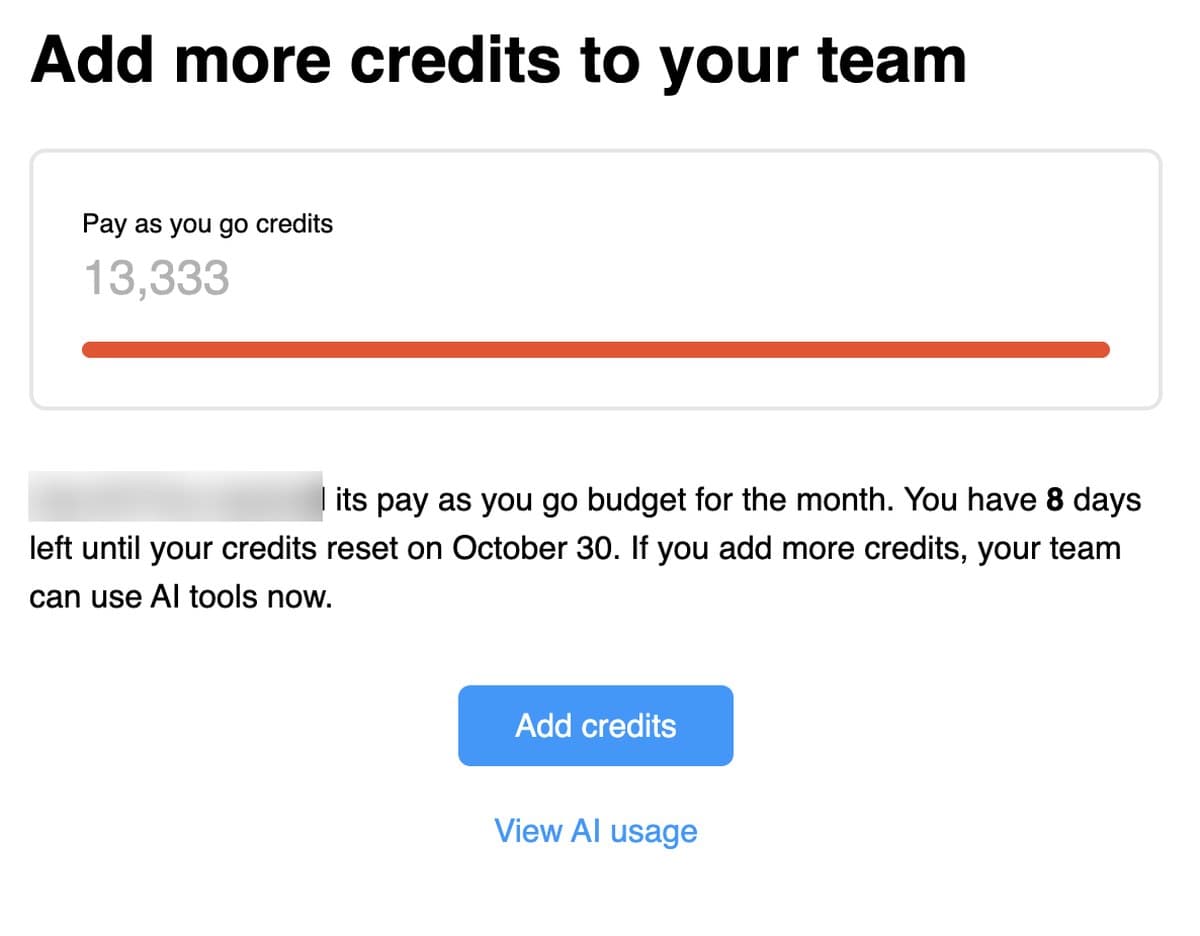
The dialog explains the number. 'Reached its pay as you go budget for the month' means an admin set a monthly spending limit in dollars, and 13,333 is what that limit buys. At the $0.03 per credit that Figma staff quoted for pay-as-you-go in May 2026, 13,333 credits is $399.99: a $400 cap. (Figma said in August that add-on credits on Professional doubled 'for the same cost'; if that applies to pay-as-you-go, the cap was $200. Figma shows the live rate only inside the dashboard, and that's where to confirm it.) So the month's AI bill was the seat subscriptions plus a few hundred dollars of overage, and it bought roughly 25,000 credits of actual work: around 11,000 from seats (three full allotments plus two partial ones) and 13,400 from the pool. Meanwhile the under-used seats carried well over 10,000 included credits that will expire on October 30 unused, because seat credits 'can't be shared or transferred to other users.' That is the design, not a bug, and it is the single most requested change on Figma's forum ('Allow credits from 1 seat to be leveraged / moved to another by admins,' March 2026; 'AI Credit Sharing,' August 2026). What the dashboard doesn't tell us, because 'granular reporting by feature is not available at this time,' is what the two heavy users were doing: Make, the agent, image generation, or Weave tools. Given the timing, with the agent and Weave tools starting to bill on October 6, we'd bet on a mix, and the fix below covers all three.
How to check your balance, and see who's spending
- You, any seat: open a file you can edit (View seats: a file in your drafts), open the file's Main menu, choose AI balance. It shows credits used, credits remaining, and your reset date.
- Per prompt, in Make: hover the AI credits icon under a completed prompt to see what it cost.
- Admins, team view: Admin tab, then AI credits, then View. You get the pool status, active users, days to reset, and the per-user table with seat and paid bars.
- Admins, one person: Admin, then People, select the person, then the AI credit usage section.
- History and CSV: Organization and Enterprise admins only, back to November 2025. Figma notes that usage during betas isn't included in the export.
- By feature: not available. 'Granular reporting by feature is not available at this time.'
- By API: Enterprise only, an AI Usage API that returns per-user, per-day consumption.
How to buy more credits, and what they cost
Only admins can buy, only on paid plans, and there are two products. A subscription is a monthly package of credits added to the plan's shared pool; tiers 'are not one-time purchases and don't stack,' so you pick one size and it renews. Pay-as-you-go bills only what's used, 'up to a monthly spending limit' you set, added to the next invoice. The path is Admin, then AI credits, then View usage, then Add credits, then choose a tier or click through to pay as you go and set a spend limit. On Professional, add-ons are month-to-month even on an annual plan; on Organization and Enterprise they're an annual subscription aligned to your contract, billed quarterly, and can be cancelled 'only during the 30 day renewal window.'
| Package (Dec 2025 pricing) | Pay-as-you-go | Subscription | Per credit |
|---|---|---|---|
| 5,000 credits | $150 | $120 | 3.0¢ / 2.4¢ |
| 7,500 credits | $225 | $180 | 3.0¢ / 2.4¢ |
| 10,000 credits | $300 | $240 | 3.0¢ / 2.4¢ |
Those are the only prices Figma has ever published, in its December 9, 2025 blog post; the help center now says only that 'the price per credit decreases as more credits are purchased' and 'you can see pricing … from your admin dashboard.' Two things have moved since. On August 25, 2026, Figma said add-ons 'include more credits for the same cost': '2x more credits on the Professional plan, and 1.6x more credits on the Organization and Enterprise plans.' And pay-as-you-go, which was Organization and Enterprise only at the March 11 launch, reached Professional in May. So a Professional subscription tier that was 5,000 credits for $120 should now be 10,000 for $120, or 1.2 cents a credit; whether pay-as-you-go also doubled is not stated. For scale against the seat price: a Professional Full seat is $16 for 3,000 credits, about half a cent each, which is the arithmetic behind the forum's 'six times more expensive' complaint, and the reason the first lever is never the Add credits button.
How to stop the bleeding: admin controls and user habits
Admin controls, in the order we'd use them. First, set per-user paid-credit limits: Admin, People, select the user, AI credits, Manage, and choose Full access, a credit limit, or No access. This caps only paid credits; seat credits are untouched. For the two heavy users on our dashboard, a limit of a few thousand paid credits each would have turned a drained pool into a conversation. Second, if you're on Enterprise, set a default: Admin, Settings, Billing, 'Paid AI credit defaults,' rolling out since October 22, 2026, so new users don't inherit Full access; the same control is available through SCIM with an aiCreditLimit attribute. Third, Enterprise billing groups can be given their own slice of the pool so one department can't drain another's. Fourth, decide between subscription and pay-as-you-go on the numbers: if your team reliably uses the pool every month, the subscription's lower per-credit price wins; if usage is spiky, a pay-as-you-go spend limit is the safety rail. Fifth, when a user hits zero they can click Request more, which emails the admin; decide in advance what you'll say.
User habits, from Figma's own guidance. Pick Gemini Flash in Make for simple tasks and save Opus for the hard ones. Edit text and code directly instead of prompting for small changes; use point-and-edit. Batch several changes into one prompt rather than five. Plan before building, but know the build is billed separately. Start a new file when a session gets long, since context cost compounds. Don't use conversation mode to make edits. Skip Payload unless you need a backend. Watch for features leaving beta: the agent and Weave tools on October 6, code layers on November 4, and the Argon and Flash introductory rates on November 30 and December 31. And for image generation, note the model multiplier: a ChatGPT Images 2.0 image is 2 credits, a Nano Banana 2 image is 16, eight times more.
Weave credits are a different thing
This trips people up because the products share a name. Weave tools that you run inside Figma Design (the fixed 13-to-110-credit items above) use Figma AI credits. Working in Figma Weave itself at weave.figma.com uses a separate currency, Figma Weave AI credits, with its own plans: Free with 150 credits, Starter $24 a month for 1,500, Professional $45 for 4,000 with three-month rollover, Max $100 for 10,000, Team $42 a user. Figma's help center: 'these two pools are separate,' and the legal terms state that 'Figma Weave is not considered "Figma AI" and Credits do not apply to Figma Weave.' Weave's credits also roll over on paid tiers, which Figma's don't. If your team generates a lot of images or video, running it in Weave rather than inside Figma is a different bill with different rules, and in some cases a cheaper one.
Does the Figma MCP server use credits?
Mostly no. From Figma's developer docs: 'Most MCP server tools don't use Figma AI credits.' The exceptions are generate_image, which costs the same as generating an image in Figma Design by model, and send_prompt, which uses credits 'when the Figma Make agent creates or changes code.' Importing a project with send_code_to_figma is free on first upload; later prompts and changes bill. Weave tools called through MCP use Weave credits. Separately from credits, MCP has rate limits by seat: 20 calls a month for Starter, View, and Collab; 200 a day on Professional and Organization Full and Dev seats; 600 a day on Enterprise. Our MCP servers ranking covers the Figma server itself.
How we got here: the timeline
| Date | Change |
|---|---|
| May 2025 | Figma Make launches in beta at Config, free with unspecified usage limits |
| July 24, 2025 | Make and all AI features leave beta; credits 'included with all seats'; Figma says it 'won't be strictly enforcing credit limits for Full seats' |
| October 30, 2025 | Figma acquires Weavy, which becomes Figma Weave |
| December 9, 2025 | Credits get a balance menu, an admin dashboard, and a published price table; enforcement announced for March 18, 2026 |
| March 11, 2026 | AI Credit Terms take effect; subscription packages on sale; pay-as-you-go for Organization and Enterprise |
| March 18, 2026 | Full-seat limits enforced; overages before this date not billed retroactively |
| May 2026 | Pay-as-you-go reaches Professional at $0.03 a credit; the Figma agent launches in free beta (May 20) |
| June 24, 2026 | Weave tools arrive inside Figma Design, free in open beta |
| August 25, 2026 | Add-on packages get 2× credits on Professional and 1.6× on Organization and Enterprise for the same price |
| October 6, 2026 | The agent and Weave tools go GA and start consuming credits |
| October 13, 2026 | Gemini 4 Argon arrives in Make on an introductory rate |
| October 15, 2026 | Code layers in open beta, free through November 4; consumption table updated |
| October 22, 2026 | Enterprise paid-credit defaults and SCIM limits begin rolling out |
| November 4, 2026 | Code layers start billing |
| November 30 / December 31, 2026 | Argon and Gemini 3.8 Flash introductory rates end; their credit cost rises |
How Figma's credits compare with Canva, Adobe, Framer, Lovable, and v0
| Tool | Unit | Included | Roll over? | Buying more |
|---|---|---|---|---|
| Figma | AI credits, shared across features | 500–4,250 per seat per month by plan | No | Admin-only subscription or pay-as-you-go; price in dashboard (last published 2.4–3¢) |
| Canva | 'AI allowance' shared across Standard, Premium, Ultra tools | Free: up to 20 uses; Pro: 10× Free; Business: 20× Free | Not stated | AI Pass add-on (up to 40× Pro) and top-ups |
| Adobe | Generative credits | Firefly Standard $9.99 for 2,000 up to Premium $199.99 for 50,000; standard generations unlimited on CC Pro | No | Credit plans; failed generations typically refunded |
| Framer | AI credits | Free 500 to try; Basic $10 for 1,000; Pro $30 for 3,000 | Not stated | Plan upgrades |
| Lovable | Credits | Free: 5 a day, up to 30 a month | Yes, expiring after two months | Paid tiers |
| v0 | Dollar-denominated credits | Plus $30 includes $30 of credits plus $2 free daily | Not stated | Priced per model token |
Figma is in the middle of the pack on generosity and near the bottom on transparency. Adobe refunds failures and prices every feature per generation; Framer and v0 publish simple numbers; Figma publishes ranges for the cheap features, 'approximately 30+' for the expensive ones, and asks you to open the admin dashboard to learn what a credit costs. Our AI website builders ranking covers Framer and Lovable in depth.
Our read
The system is coherent once you see it, and it is coherent in Figma's favor. Seat credits are a per-person allowance that can't pool, so a team that pays for eight seats gets eight small meters instead of one useful one, and the idle meters expire while the busy ones overflow into paid credits at five to six times the seat rate. Variable pricing on Make and the agent means the only way to learn what a task costs is to run it, and the beta-to-billing pattern means features you got used to for free start charging on a date you may have missed. None of that is hidden; all of it is spread across nine help articles, a legal page, a blog post from last December, and forum replies. What we'd do, and what we're doing: set paid-credit limits on every user today, default new users to a limit, pick Flash for small Make tasks and edit by hand for tiny ones, and treat the October 30 reset as the start of a month where the dashboard gets checked weekly instead of when the banner turns red. What we'd ask Figma for, with the forum: let admins move unused seat credits to the people doing the work, show the per-credit price on the pricing page, and break usage out by feature so an admin can tell a Make binge from an image-generation binge. We'll update this guide when the November 4 code-layers change lands, when the Argon and Flash rates change, and if Figma publishes new prices.
Where these apps rank