
Guides
How to Make the Yung Lean STORM AI Video (and What You're Actually Copying)
By the Top5Apps editorial team · Published September 20, 2026 · Updated September 30, 2026 · 7 min read
Update, September 30: the same tools now power a second trend — swapping the two rappers in Quavo and Takeoff's 'Hotel Lobby' COLORS performance for any pair. It's the cleaner tutorial (two faces, no crowd), and Quavo has reposted the original. How to make the Hotel Lobby AI video. A third guide covers the one-person version — the private-property pickup clip — using Genjutsu's Object Swap.
What this is: the AI videos flooding your feed — a crowd of uniformed schoolboys snapping into synchronized waves around one motionless figure, except the figure is a footballer, an influencer, or you — are re-creations of about thirty seconds from GENER8ION's 'STORM starring Yung Lean', a 7½-minute film directed by Romain Gavras and choreographed by Damien Jalet, released April 24, 2026. The sequence starts at 4:47. It's not a Yung Lean song — Lean stars in it and co-wrote it — and it's not an AI video. It was ~60 real dancers on real steps in Leeds. The AI versions copy the motion and swap the people. Here's how they're made, where they break, and what you owe the people who made the original.
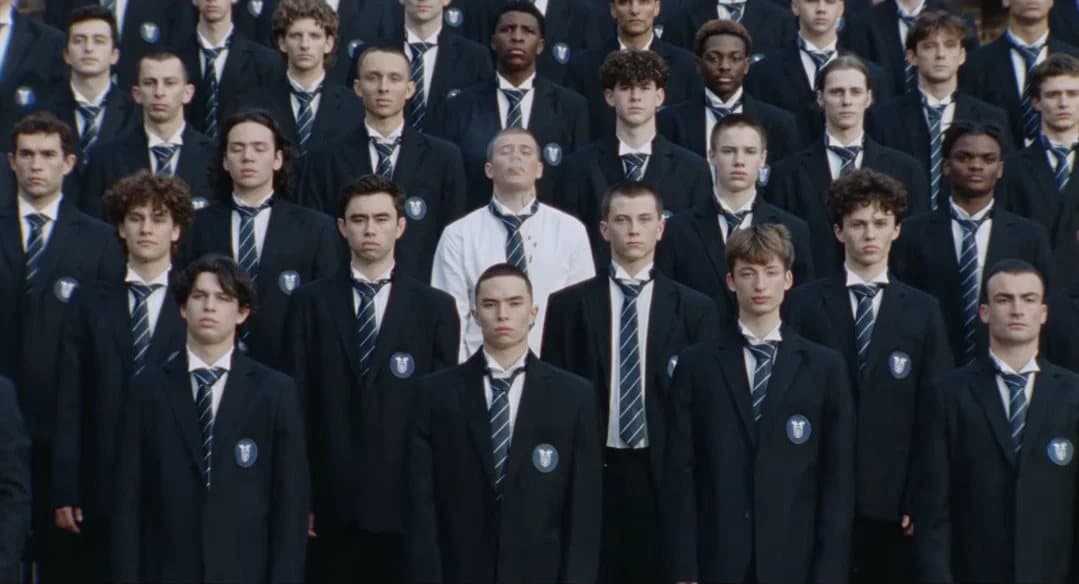
The 30 seconds that matter
Watch the official upload — 23 million views as of this week — and skip to 4:36: the boys assemble in tiered rows for a school photo, and Lean, in a white shirt and bloodied, walks backwards through the crowd to a spot at the center. At ~4:47 the crowd erupts into the first synchronized wave while he stands dead still. 4:47 to 5:17 is the clip every AI version uses, and the wide shot on the steps at ~4:57 is the frame you've seen a hundred times. The choreography runs almost three more minutes (jackets come off later); the film ends at ~7:16 on a close-up of Lean, head bowed.
Context the tutorials skip: this is the lead single from GENER8ION's album Love & Tears, nominated for four MTV VMAs this month including Best Choreography and Video of the Year. Gavras told Wallpaper* he cast 'young kids where you don't feel like they're dancers' so 'when the choreo arrives, you're surprised,' and that the reaction to STORM was, in his words, 'AI could never do this.' That line is now the whole story.
What the format actually is
Every version is the same three-part trick: a reference video (the 4:47–5:17 clip), a motion-transfer model that keeps the camera moves, timing, and crowd formation while rebuilding everything else, and reference images for the new lead and the new crowd. The tool doing the work in nearly every English-language tutorial is Higgsfield Genjutsu — its Motion Transfer mode 'keeps the motion, camera and timing while rebuilding the scene from your references,' per Higgsfield. The model most people credit, ByteDance's Seedance 2.5, is the co-enabler: it introduced reference-to-video generation with up to ten video clips and thirty images as references in a single 30-second pass, and it's what Dreamina and several third-party apps run underneath.
The tools, in the order people actually use them
- Higgsfield Genjutsu — the trend's workhorse. Motion Transfer takes a 4–30 second reference clip plus up to 30 reference images and outputs up to 1080p. Higgsfield's own pricing examples: a 15-second clip runs roughly $2 at 480p, ~$5 at 720p, ~$7 at 1080p in credits; free generations exist but are limited and watermarked — check in-app.
- Dreamina (Seedance 2.5) — ByteDance's international front end. The feature is R2V (reference-to-video); clips up to 30 seconds, up to 50 multimodal references, free generations with watermarks and premium tiers for clean downloads. The purer 'Seedance' route, with fewer step-by-step tutorials.
- Pauk AI — a Telegram/VK bot with a one-click 'Storm II' template (one photo in, video out, audio not included). Dominant in Russian-language guides; essentially unknown in English ones.
- Pollo AI and Renoise — both host Seedance 2.5 (Renoise since August 7, no free tier; Pollo also via API). We found no STORM re-creations made on either. They're capacity, not the trend.
The method (not a prompt pack)
- 1. Clip the reference. Download or screen-record 4:47–5:17 of the official video. Longer than 30 seconds and every tool rejects it; shorter than the full wave and the formation never reads.
- 2. Prepare two reference images. One clean, front-lit photo of your lead (the white-shirt figure), and one of the 'crowd unit' — a single person in the outfit you want cloned across the rows. The crowd is one character repeated; that's how the tools keep it consistent.
- 3. Motion Transfer on, describe the replacement, not the dance. The model already has the choreography from the clip. Your prompt's job is the swap: who the lead is, what the crowd wears, what the setting is — and an explicit instruction to keep the original shot sizes, camera moves, and crowd count. Every good tutorial's 'avoid' list is the same: no altered shot sizes, no extra people, no identity blending, no original crowd remnants.
- 4. Generate short, then extend. Get the first 10–15 seconds right before paying for the full clip. Credits are the real cost of this trend.
- 5. Label it and credit it (next two sections).
The three ways it breaks
Costume blending. The crowd's outfits drift between shots — a tie appears, a blazer changes color, the lead's shirt borrows from the crowd. Tutorials fight it by locking one crowd reference image and naming the outfit explicitly. Extra or missing people. The formation gains a duplicate lead, loses a row, or grows a spare arm in the back tier — 'extra or missing people, malformed hands' is the most-pasted line in every avoid-list. Faces dissolving in the wide shot. The ~4:57 steps shot is the money frame and the hardest: faces are tiny, so identity collapses into 'warped faces' and 'animated masks.' The honest fix is to accept that the wide shot sells formation, not likeness — put your face in the tight shots and let the wide one be a crowd.
What you're actually copying — and how to credit it
Here's the part the two-minute prompt videos leave out. The thing that makes these clips work isn't the AI — it's Damien Jalet's choreography and Romain Gavras' staging, built over months with ~60 named dancers (the credits list every one of them) and shot on real steps. Viewers have compared the seated-rows, waist-up, head-swaying canon to Indonesia's Saman dance, a UNESCO-listed tradition from Aceh — a resemblance that's visible, though neither Gavras nor Jalet has cited it, so treat that as viewer commentary rather than a credit. The choreography is separately copyrightable; the film belongs to GENER8ION and Iconoclast.
Rachel Karten@milkkarten
it's so frustrating watching the creative direction from yung lean's music video become a viral ai prompt. the speed and volume that accounts are able to essentially rip off work today is not good!
View original post ↗
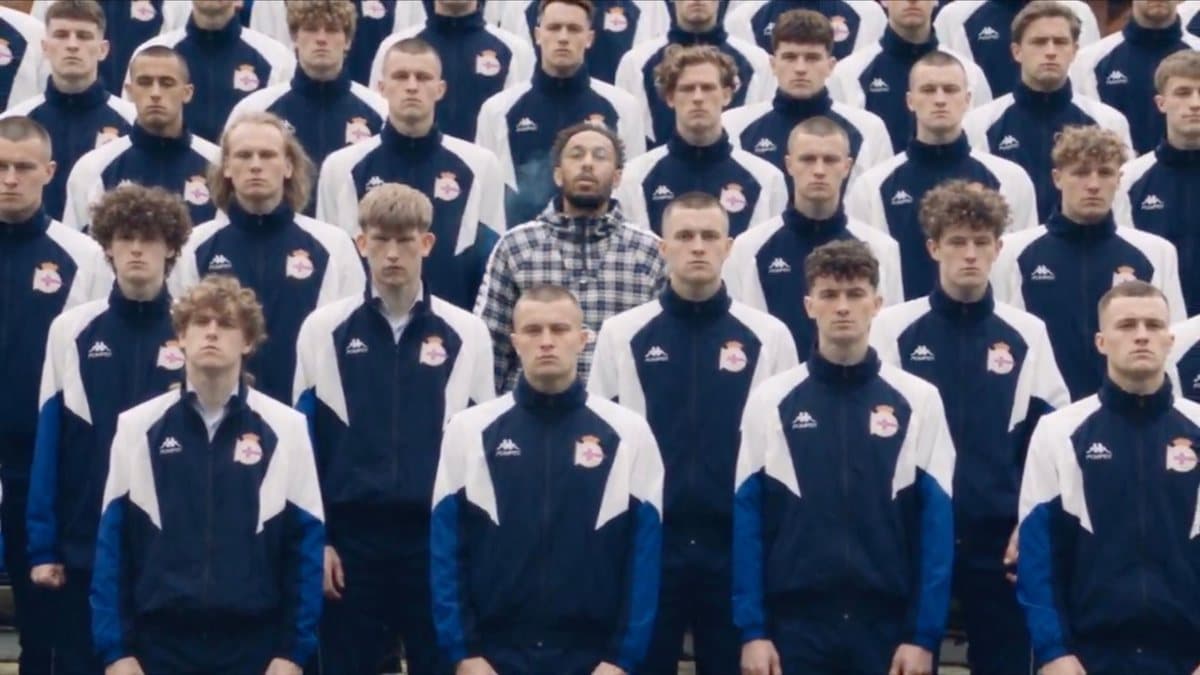
The backlash is real and specific. The most-viewed version — a spec ad putting footballer Pierre-Emerick Aubameyang's face over the STORM crowd, 16.9 million views on X from an account with a few hundred followers — credits neither the video nor its makers. Esquire Vietnam's op-ed put the critique plainly: personalizing the surface 'turns someone else's artistic achievement into an accessory for your personal brand.' As of this writing, Gavras, Jalet, Yung Lean, and Iconoclast have said nothing publicly, and no takedowns have been reported — which means the norms are being set by creators, right now. The legal weather is changing too: the NO FAKES Act, which would create a federal right against unconsented 'digital replicas' of a person's likeness, cleared the Senate Judiciary Committee in June; a face-swap of a real celebrity is precisely what it targets. And TikTok now auto-labels AI content via C2PA credentials — it has labeled over three billion videos — so 'passing it off' is getting harder anyway.
- Credit in the caption: 'Re-creation of GENER8ION – STORM starring Yung Lean (dir. Romain Gavras, chor. Damien Jalet). Made with [tool].' Link the official video.
- Label it as AI where the platform asks — and where it doesn't.
- Don't put a real person's face in it without their okay. Yourself, fine. A footballer, a classmate, an ex — that's the digital-replica problem Congress is legislating.
- Don't claim the choreography. 'My concept' is the line that gets you ratioed. 'Jalet's choreography, my face' is the line that gets you shared by the fans of the original.
Bottom line: the STORM trend is a motion-transfer trick — 30 seconds of reference video, two photos, and a model that keeps the dance and swaps the dancers — and it takes about ten minutes and a few dollars in credits. The reason it works is the thing it can't generate: a choreographer, a director, and sixty kids who rehearsed until it looked effortless. Make it, label it, credit it. The trend cools in weeks; the video will still be the video.
Where these apps rank