
Guides
How to Make the 'Hit the Road Dude' AI Video (the Private Property / Lock 'Em Up Meme + Higgsfield Genjutsu)
By the Top5Apps editorial team · Published September 30, 2026 · Updated September 30, 2026 · 7 min read
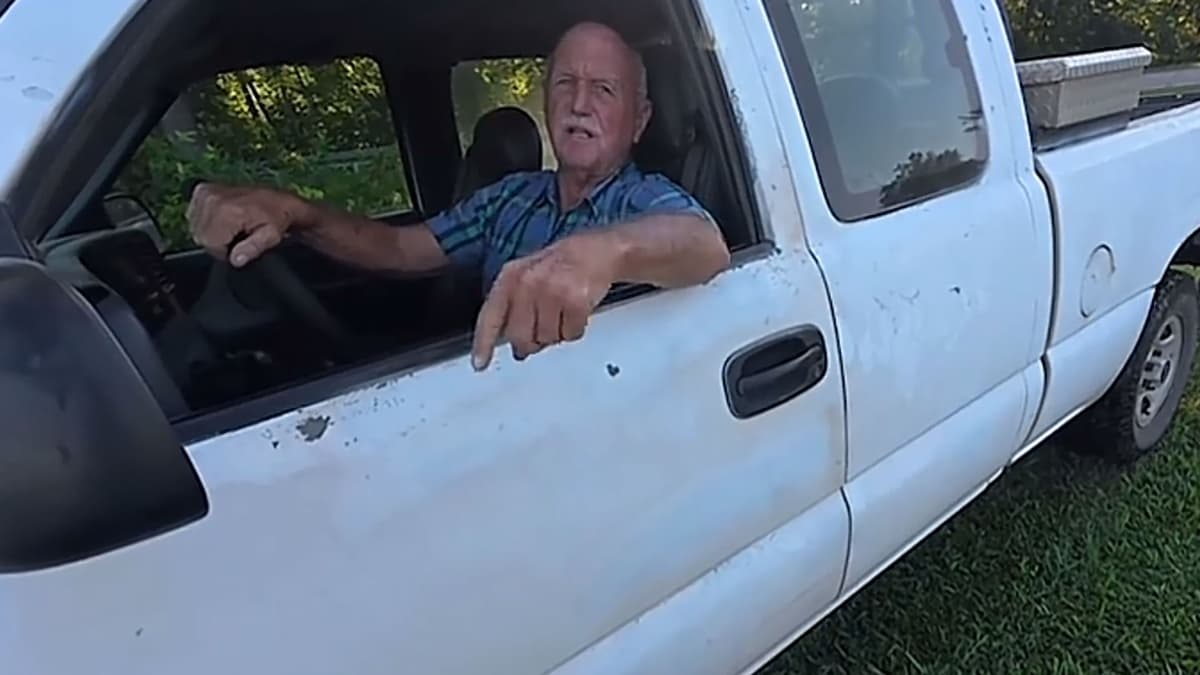
*Short answer: it's a year-old TikTok of a man in a white pickup running two fishermen off a pond, and the AI versions keep his truck, his pond, and his timing while swapping him for someone — or something — else. The original, posted by @bird28thegr8 on August 21, 2025 as 'Angry grandpa kicks me out my fishing spot,' is at 20 million plays; the follow-up cut titled 'Hit the road dude' added 1.8 million. Know Your Meme files it as 'Lock 'Em Up,' after the phone-call punchline. The tool that fits is Higgsfield Genjutsu's Object Swap — the mode built to 'change a selected character… while preserving the rest of the original shot' — and the finishing move every good version shares is the same: put the original audio back underneath.* This is the third guide in our series, after STORM and Hotel Lobby; it's the easiest to make and the one with the most rules attached, because the man being replaced isn't a celebrity.
What the clip is — and what's actually documented
Know Your Meme's account: 'a confrontation with an elderly man in a truck who kicked them out of a fishing spot. The man asks the TikToker if he got permission… and the TikToker says he did not, thinking the spot was on state property. The man rants to them about it being private property and tries to get their info to find out who told them it was state property.' The beats everyone copies are the incredulous back-and-forth over 'state property,' the dismissal — 'hit the road, dude,' per the creator's own caption — and the phone call at the end, where the man relays that the owner said to 'lock 'em up.' The first remixes were lip-dubs within three days; a CapCut green-screen edit followed on August 31, a courtroom edit on September 3, and a YouTube recut by Hanging With The Hennings has 352,000 views. Two things circulating that we couldn't verify anywhere: that the man gave a fake name, and the exact wording of his opening line. Treat transcripts you see online as paraphrase.
The family got its say. The property owner's son — who runs the local tractor dealership the man names in the clip — posted an apology in mid-September 2025 that reached about 8 million views, saying the way his father handled it 'was not something he agreed with,' per Primetimer's account, and that the situation had been 'considered a race issue. That's not me, my family, or my business.' Two days later the business's account posted the fishermen a video captioned 'Consider this your written permission!' — 4 million plays. That's the context the AI versions are built on, and it's why we'd keep the joke on the archetype — the grumpy landowner — rather than on the specific man.
Is there really an AI trend?
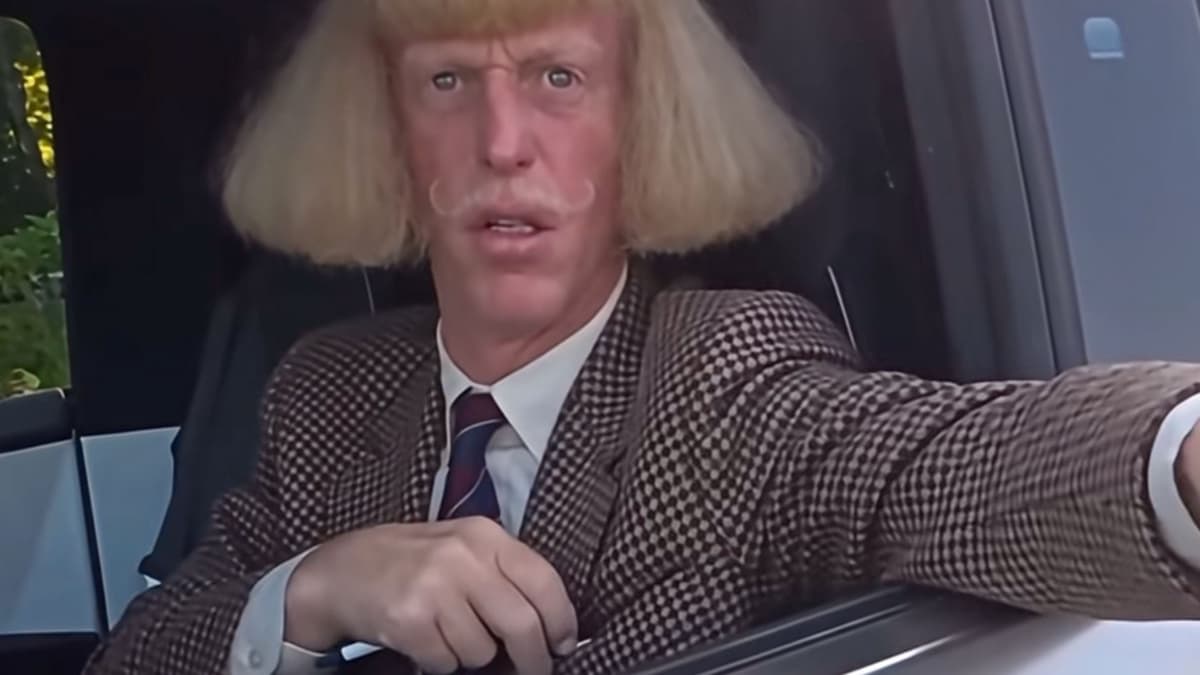
Honestly: the documentation is thin. The clip you've probably seen recast — a cartoon, a dog in the driver's seat, a caricature in a blond wig — is real, but the 2.4-million-view example most people point to (@saintmemeco, September 6, 2025) carries no AI label and may be a lip-dub, and the only write-up describing a 2026 AI wave is a template vendor's blog from September 28. Know Your Meme hasn't updated the entry since September 2025, and no press has covered the AI versions. So this is a meme with a year of life and a current second wind in AI tools — not a trend with a traceable AI origin like Hotel Lobby's. The technique is worth learning regardless, because it generalizes to any 'one person in a fixed scene' clip.
Method A — Genjutsu Object Swap (the one that matches the meme)
Higgsfield's Genjutsu has two modes, and this meme wants the second: 'Motion Transfer keeps the motion, camera and timing while rebuilding the scene from your references. Object Swap changes a selected character, outfit, product, location or object while preserving the rest of the original shot.' Inputs are one video of 4–30 seconds and up to 30 reference photos; output up to 1080p.
- 1. Trim the original to the 8–20 seconds you want — the 'state property' exchange through 'hit the road' is the cut most versions use.
- 2. Higgsfield → Video → Genjutsu → Object Swap. Upload the clip, then two to four reference images of your replacement (front and three-quarter, similar lighting). Tag them @Image1, @Image2 in the prompt — the convention comes from Seedance and works across tools.
- 3. Name what changes and list what stays. The prompt below is the shape people who get good results use; don't describe the whole movie.
- 4. Generate at 720p first. Only pay for 1080p once a take is right.
- 5. Finish in CapCut (below). Even a good swap drifts on the lips; the original audio underneath is what makes it land.
Keep the exact camera, timing, and lip movement. Replace the older man leaning out of the pickup with the character in @Image1 and @Image2. Keep the two fishermen and the rural pond. Late-afternoon documentary look. Do not change the dialogue timing.
Use Motion Transfer instead if you want a new location and cast — a dog in a space station, say — and only the acting and timing preserved. That's the STORM and Hotel Lobby method; it costs the same and needs more references.
Method B — from scratch, if you don't want to restyle the clip
- Stills first: generate your characters at a pond with Higgsfield Soul, its photo model.
- Then image-to-video with Seedance 2.5 (native audio and lip-sync) or Cinema Studio, prompting the beat, not a screenplay: 'Handheld documentary, rural fishing pond, older man leaning out of a white pickup pointing at two young men with rods, telling them it's private property. Late afternoon, medium shot.'
- If the speech is weak, run it through Higgsfield's Lipsync Studio — or skip generated audio and lay the original sound under it in CapCut anyway, which is what the good ones do.
What it costs
Higgsfield's own credits explainer gives the per-clip math: a 5-second 1080p clip is 45 credits (about $2.25) on Seedance 2.0, 50 on Cinema Studio, and about 8–13 credits (under a dollar) on Kling 3.0 — the budget pick if you only need motion. At 720p, Seedance drops to 23 credits. Plans, per three independent write-ups of Higgsfield's pricing page as of late September: Starter $19/month for 270 credits; Plus $59 (or $47 annual) for 1,200; Ultra $129 (or $99 annual) for 3,000; Higgsfield's own copy is inconsistent on the Plus allowance, so trust the number on the Generate button — Genjutsu shows the charge before you commit. Credits expire each cycle.
The CapCut finish (what actually goes viral)
- 9:16, 8–15 seconds.
- The original dialogue underneath, AI audio muted. Nobody's inventing new lines; the cadence is the meme.
- Big captions on the beats: STATE? → HIT THE ROAD DUDE → THIS IS PRIVATE PROPERTY.
- Hard cut on the dismissal.
- The lazy route exists — CapCut, Kling, and PixVerse all host one-tap templates for viral clips — but we couldn't find a current template for this one by name, so you may be building it yourself.
The rules — stricter here than for Hotel Lobby
Two things make this clip different from a Migos performance. The man in it is a private individual, and so are the fishermen. TikTok's current Community Guidelines require labels for AI or 'significantly edited content that shows realistic-looking scenes or people,' and the not-allowed list begins with 'using the likeness of private figures without consent' — a private figure being any adult who isn't a public figure. Replacing him with a cartoon or a dog is the version that's cleanest: his likeness leaves the frame. Putting a real friend in his seat needs that friend's okay. Deepfaking a different real person into the truck is the version that gets removed. Higgsfield's terms say the same from the other side: you must have 'obtained all consents, releases, and permissions required under applicable law from each individual whose face or voice is included.'
- Label it AI. TikTok's own disclosure examples include 'a face is replaced with someone else's.'
- Credit the source: 'Re-creation of @bird28thegr8's August 2025 clip. Made with [tool].'
- Keep the joke on the archetype, not the man. The family apologized, the fishermen got their permission slip, and the meme works fine as 'grumpy landowner' without a target.
- No brands, no ads. The audio belongs to the creator who filmed it, and nothing here is licensed.
How the three trends compare
| STORM | Hotel Lobby | Hit the Road Dude | |
|---|---|---|---|
| Source | A music video | A studio performance | A bystander's phone clip |
| Who's replaced | A rapper and a crowd | Two rappers | One private man in a truck |
| Mode | Motion Transfer | Motion Transfer | Object Swap — keep the scene |
| Hard part | Crowd identity drift | Left/right swap | Lip drift — fixed by the original audio |
| Rights picture | Film and choreography | Label, performance, two celebrities | A private individual's likeness; TikTok's strictest rule |
| Rights holder's response | Silence | Quavo reposted the original | The family apologized and granted the fishermen permission |
Our read
This is the easiest of the three to make and the one to think hardest about. Object Swap on a fixed camera, one subject, and a 15-second clip is close to a solved problem; you'll have a usable take in three generations and under five dollars. What the tools can't do is decide who the joke is on. The versions that have aged well swap the man for something absurd and let his cadence carry it; the ones that would get a video pulled, and deserve to, put a real person's face in a stranger's bad afternoon. Learn the technique here — it works on any 'one person, one scene' clip you'll ever want to remix — and point it at an archetype. Our AI video ranking covers Seedance, Kling, and the rest for everything that isn't a meme.