
Signals
What Is Gemini Decision 1? Google's New AI Can't Write a Word, Reads for 10 Cents a Million Tokens, and Borrows a Startup's Vocabulary. What It Does, What It Costs, What Google's Own Chart Admits, and How to Test It on 50 Real Items
By the Top5Apps editorial team · Published November 12, 2026 · Updated November 12, 2026 · 14 min read
Short answer: Gemini Decision 1 is a model that reads one thing and answers fixed questions about it with probabilities, and does nothing else. It is fast, it costs ten cents per million tokens read, and it is the third product of its kind, not the first. Google launched it on November 11. TypeSafe shipped the idea in September, and OpenAI followed in October at the identical price. What Google adds is audio, video and PDFs, a thousand questions at a time, and a free tier. What it hasn't shown yet is independent proof of the calibration its whole pitch depends on.
We read Google's launch post, documentation, pricing page, cookbook and benchmark chart, OpenAI's and TypeSafe's documentation for the rival products, and the first independent measurement. We have not run the model ourselves yet, and say so again below.
Logan Kilpatrick@OfficialLoganK
Introducing Gemini Decision 1, our new frontier decision model in the Gemini API. It is $0.10 per 1M input tokens with no additional cost. With support for image, audio, video, and PDF natively, 256K context window, & 1K questions. You can try it for free in the API!
View original post ↗
The short version
- What it is: you send one input and up to 1,000 questions with fixed answers. It returns a probability for each. It cannot write a sentence, explain itself or hold a conversation.
- Three kinds of question: yes or no, multiple choice with up to 255 options, and a score on an ordered rubric.
- Price: $0.10 per million input tokens and $0 for output. A thousand support emails with five questions each comes to about five and a half cents.
- Speed: 150 to 250 milliseconds by Google's figures. Artificial Analysis measured 211.
- It is third. TypeSafe's Jev launched this category on September 15 and OpenAI's Decisions API followed in October at the same $0.10. Google's API uses TypeSafe's word, 'noul,' for a yes-or-no question.
- Google's own chart is more modest than its headline. Decision 1 wins seven of nine rows. Jev wins two and costs less on the shared tests, $0.68 to $0.88.
- Independent testing so far: 66 on Artificial Analysis's Decision Index, ninth of 18 and level with Jev. Nobody outside Google has verified its calibration figure.
- Watch the free tier. Free-tier inputs can be used to improve Google's products and read by reviewers. Real customer data belongs on the paid tier.
- Our read: use it to sort, tag and triage, with a person checking the unsure cases. Don't let it say no to a human being on its own.
What Gemini Decision 1 is, in plain language
Every AI model you have used so far writes. You ask, it produces words one piece at a time, and you pay for each piece. Gemini Decision 1 doesn't. You hand it one thing to look at, a message, a photo, a recording, a video or a PDF, and a list of questions with fixed answers. It hands back a number for each question. That is the whole product.
Google's documentation shows the smallest possible example. The input is one sentence from a customer. The question is whether the item arrived damaged.
Request and response, from Google's docs
{
  "model": "gemini-decision-1",
  "input": "The blue mug I ordered on Monday arrived cracked on Wednesday.",
  "questions": {
    "is_damaged": {
      "type": "noul",
      "instructions": "Did the item arrive damaged?"
    }
  }
}

# what comes back
{
  "answers": {
    "is_damaged": { "type": "noul", "noul": 0.99, "confidence": 0.99 }
  },
  "usage": { "total_input_tokens": 100, "total_output_tokens": 0 }
}
Read the answer: 0.99. The model is saying it is 99% sure the mug arrived damaged. There is no sentence, no apology to the customer, no offer to draft a reply. And look at the last line. Output tokens: zero. You paid to have the message read, and nothing for the answer.
| Question type | What you ask | What you get back | Limits |
|---|---|---|---|
| Yes or no (the type is spelled 'noul') | Is this true of the input? | One probability from 0 to 1 | — |
| Multiple choice ('choice') | Which of these options fits? | The winner, plus a probability for every option | 2 to 255 options |
| Rubric score ('score') | Where does this fall on an ordered scale? | A weighted score, plus a probability for each level | 2 to 255 levels; Google recommends 2 to 10 |
You can ask up to 1,000 questions about the same input in one request, and mix the three types freely. The input and all the questions together can run to 262,144 tokens, which is several hundred pages of text. Google's launch example is a photo of a kitchen counter and three questions: is there a spill, which cleanup action fits, how bad is it. (Yes, 'noul' is a strange word. It has a history, which we get to below.)
Why an AI that can't write is cheap and fast
A normal model answers by writing, and writing is slow. To say 'yes' it runs the whole network once per word-piece, often after hundreds of hidden 'thinking' pieces you are also billed for. Google's post says Decision 1 instead scores the candidate answers 'in a single forward pass.' It reads everything once and reports how strongly it leans toward each option. No sentence is ever composed.
Three things follow from that.
- Speed. Google reports 150 to 250 milliseconds end to end, with 50 to 100 milliseconds of that being the model itself, and says latency 'stays nearly flat' from 1 question to 100. A quarter of a second is fast enough to sit in front of every message a product receives. These are Google's figures.
- Price. $0.10 per million input tokens, and $0 for output. No thinking tokens, and no separate charge for transcribing audio or reading text out of images. The shared input is billed once however many questions you ask; each question adds only its own few words.
- A number instead of a sentence. Your code can act on 0.99 directly. It can also act on 0.55, which is the more useful case: send that one to a person.
What it costs, with real numbers
Ten cents per million input tokens means little until it is attached to a job. Google's cookbook gives the token counts for each kind of input, so the arithmetic below is ours, on Google's figures.
| The job | Roughly how many tokens | Cost on the paid tier |
|---|---|---|
| 1,000 support emails, five questions each | About 550 per email: 400 of message, 150 of questions. 550,000 in all | $0.055 |
| 50 portfolio images, ten questions each | About 1,090 per image at default resolution, plus 300 of questions. 69,500 in all | $0.007 |
| One hour of recorded calls | About 25 tokens a second: 90,000 | $0.009 |
| A ten-minute video | About 91 tokens a second: 54,600 | $0.005 |
| A 100-page PDF | About 520 a page before its text: 52,000 and up | $0.005 and up |
Every row is under six cents. Asking ten questions about an image costs almost the same as asking one, because the image is read once. At these prices the bill stops being the reason not to check something.
Two corrections to the launch-day framing, though.
- Ten cents is not a new low for reading. Google's own Gemini 2.5 Flash-Lite already charges $0.10 per million input tokens, and our price table has Claude Haiku 5.5 and GPT-6 Luna at the same figure. OpenAI's Decisions API has charged exactly this, $0.10 in and nothing out, since October, and TypeSafe charges less than half. What a decision model removes is everything after the reading: output tokens, thinking tokens, and one call per question.
- 'Nearly 5x cheaper than Flash-Lite' is a benchmark total, not a price ratio. On Google's chart, running seven tests cost $0.88 with Decision 1 and $4.14 with Gemini 3.5 Flash-Lite. That is 4.7 times. On list input price the gap is three times: $0.10 against $0.30.
The free tier has a price that isn't money. Google allows 200 requests a minute and 10,000 a day at no charge. Its pricing page lists free-tier data as 'used to improve our products,' and its terms say human reviewers may read it. On the paid tier neither applies. If the things you are sorting are customers' emails or applicants' portfolios, pay the fraction of a cent.
Google is third. The idea, and one odd word, came from a startup
If this sounds familiar, it should. On September 15 we wrote about TypeSafe's Jev, 'a model that doesn't talk,' and argued it was the right shape for 'the half of AI nobody demos on stage.' Jev took typed questions and returned probabilities, charged only for input, and named its yes-or-no question type 'Noul.' OpenAI shipped a Decisions API on GPT-6 Luna in October. Google's arrived on November 11.
Look at the request in Google's example again. The yes-or-no type is 'noul.' The other two are 'choice' and 'score.' Those are TypeSafe's names. OpenAI's version calls the same thing a 'predicate.' Google's cookbook says only that the type is 'named for a calibrated boolean probability.' Neither Google's post nor its documentation mentions TypeSafe outside the benchmark chart, and TypeSafe had said nothing publicly about it as of this morning.
Simon Willison, who has tried all three, put it plainly: 'This new model API is almost identical to Jev,' and it 'even reuses Jev's term "Noul" for a yes/no question.' We don't know whether that reflects an agreement, a courtesy or a convenience, and we won't guess. What can be said is that Google benchmarks itself on a test called JevBench, against Jev, in Jev's vocabulary. A startup that launched two months ago has set the terms in which one of the largest companies in the world describes this product.
| TypeSafe Jev 1.14 | OpenAI Decisions API | Gemini Decision 1 | |
|---|---|---|---|
| First available | September 15; early access | Public beta in October; now generally available | November 11; API in beta |
| Price per million input tokens | $0.042 | $0.10 | $0.10 |
| Output | Free | Free | Free |
| What it can read | Text and JSON; images experimental | Text, images, JSON | Text, images, audio, video, PDF |
| Questions per request | Not stated | 400 | 1,000 |
| Its word for yes or no | Noul | predicate | noul |
| Free tier | Not listed | Not listed | Yes, with data used by Google |
So three things are genuinely new in Google's version: sound, video and PDFs as input; a thousand questions in one request; and a way to try it without a card or a waitlist. The price is OpenAI's price. The idea is TypeSafe's. And as one quote post with 33,000 views noted: 'It costs $0.10 per 1M input tokens vs. $0.042 for Jev.'
Google's claims, checked against Google's own chart
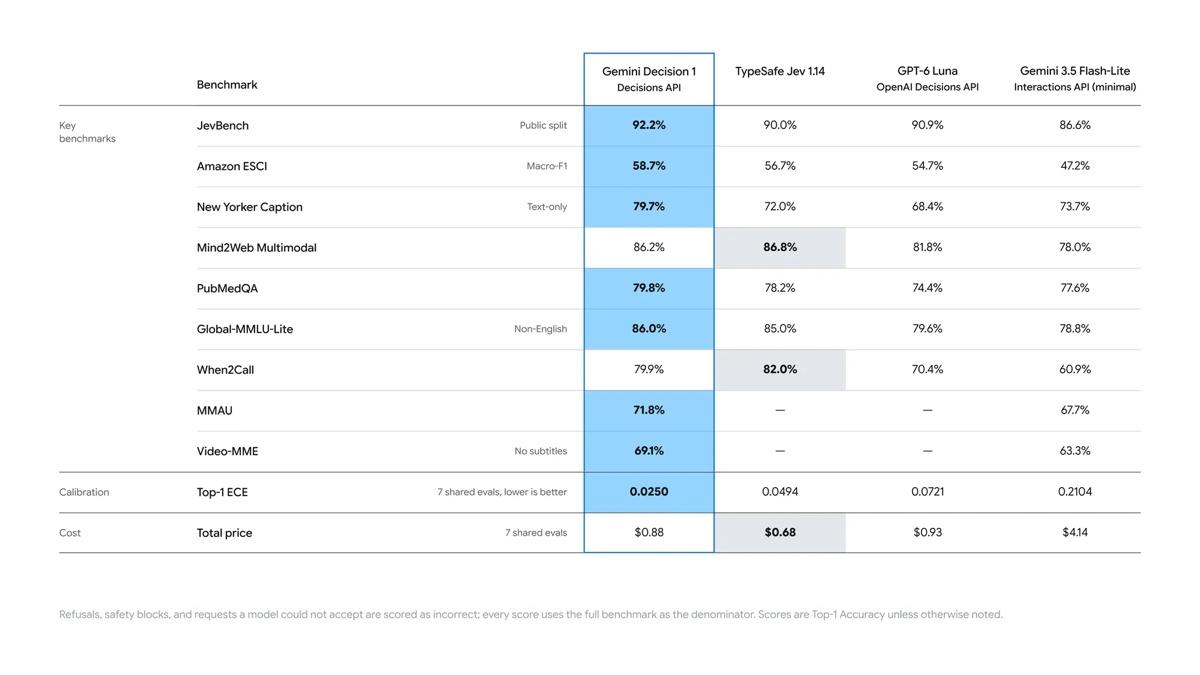
| The claim | What we found |
|---|---|
| 'Leads across the suite' | It leads seven of nine rows. TypeSafe's Jev 1.14 wins Mind2Web Multimodal (86.8% to 86.2%) and When2Call (82.0% to 79.9%). On the audio and video rows the two rival decision models show no score, so only Flash-Lite is compared. |
| 'The lowest calibration error' | 0.0250, against 0.0494 for Jev, 0.0721 for GPT-6 Luna and 0.2104 for Flash-Lite. Google's chart doesn't say who ran the tests and links no method. |
| 'Nearly 5x cheaper than Gemini 3.5 Flash-Lite' | 4.7 times on the seven-test total. Jev is cheaper than both, at $0.68 to Decision 1's $0.88. |
| 150 to 250 milliseconds | Google's figure, for inputs up to 16,000 tokens. OpenRouter's listing showed a median of 0.34 seconds on day one, through one more hop. |
| '256K context' | 262,144 tokens exactly, shared by the input and all questions. |
| '$0.10 per 1M input tokens with no additional cost' | True on the paid tier. No caching discount and no batch discount either: both are listed as not available. |
| 'You can try it for free in the API' | True: 200 requests a minute, 10,000 a day. Free-tier inputs can be used to improve Google's products. |
Credit where due: Google printed the rows it loses, and shaded them. Most launch charts don't. But the chart is still Google's, and the model has no published model card, knowledge cutoff or language list.
What independent testers have found so far
One lab has measured it. Artificial Analysis runs a Decision Index across 18 decision models, scoring accuracy, penalising overconfidence and checking whether answers hold when a question is reworded.
- Score: 66, ninth of 18. That is level with Jev 1.14 and, per Artificial Analysis's launch-day post, seven points behind two specialist models most readers will not have heard of. Its summary: 'Not yet frontier on Decision Index.'
- Speed: 211 milliseconds a task, tenth of 18, and inside Google's stated range. Artificial Analysis clocks Jev at 92.
- Cost: $345 per million tasks, fifteenth of 18. The lab calls Decision 1 'particularly expensive' for its class, and puts Jev at $156.
- Not tested: audio and video. The lab's page lists only text and image input, so Google's biggest advantage is the part nobody outside Google has measured.
Beyond that the evidence is anecdote, and should be read as such. Willison ran one video and four questions and got sensible answers, noting that Jev and OpenAI 'both return 1.0 or 0.0 for yes/no questions' where Gemini gave 0.92. One developer ran 216 bot replies containing 33 rule violations: Gemini missed eight with no false alarms, and Jev missed five. The author of JevBench has said the non-public half of that test will be rerun. On Hacker News, where the launch drew more than 500 points, the sharpest comments were about the central promise: 'You can't pre-calibrate for tasks unknown ahead of time,' wrote one, and another: 'the only way to verify calibration is having ground truth data.'
Nobody independent has verified the two numbers Google's pitch rests on: the 0.025 calibration error and the 150-to-250-millisecond latency. That is the same asterisk we printed on Jev in September.
'Calibrated' is the word doing the work
A probability is only useful if it means what it says. A calibrated model that answers '80% yes' a hundred times should be right about eighty of those times. Not ninety-five, which would make it timid, and not sixty, which would make it a bluffer. The 2017 paper that set the terms for this field defined the goal as 'predicting probability estimates representative of the true correctness likelihood,' and found that modern neural networks tend to miss it.
The measure on Google's chart is expected calibration error: the average gap between how sure the model said it was and how often it was right. Decision 1's 0.025 is a gap of two and a half percentage points. Flash-Lite's 0.21, a general model asked to pick, is twenty-one points. If that holds on your data, it is the difference between a threshold you can set once and one you can't trust.
Google's own advice is careful here. The documentation's example sends anything under 0.7 confidence to 'human_review' and tells developers to 'set thresholds using labeled examples from your own traffic.' The cookbook treats a yes-or-no answer between 0.40 and 0.60 as borderline. Two quirks are worth knowing before you set yours:
- It never says 100%. Yes-or-no answers are clamped between 0.01 and 0.99.
- It always picks. A multiple-choice question spreads its probability across the options you gave it even when none fits. If 'none of these' is a real possibility, it has to be one of the options. Google's guide recommends a catch-all; its own cookbook warns against leaning on one.
What it can't do
- Explain itself. There is no rationale field. Google's guide says to use a different API for 'generated text, summaries, or explanations.' If someone asks why a ticket was routed or a submission scored low, the honest answer is a number.
- Anything open-ended. The model page lists text generation, structured outputs, function calling, thinking, search grounding and code execution as not supported.
- Remember a conversation. Each request is one input and its questions. No history.
- Run in Google Cloud yet. It is on the Gemini Developer API only. Cloud is 'coming soon' behind an interest form, with no date. The API reference says 'This API is in Beta.'
- Cache or batch. Both are unavailable, so a long policy document sent with every request is paid for every time.
- Resist being told what to decide. The thing it reads is untrusted text. One developer reported that a fake 'compliance department' note placed inside the input flipped the model's decision 14 times out of 14, while a blunt 'ignore instructions' never worked. That is one person's test and nobody has repeated it. Treat it as a reason to test your own inputs, especially if outsiders write them.
When a person has to stay in the loop
Sorting, tagging and triage are most of what businesses actually ask AI to do, and for most of it a wrong call is cheap. A ticket lands in the wrong queue and someone moves it. A lead gets a 4 that deserved a 7 and a salesperson notices. Use the model freely there and have a person check a sample.
It is different when the decision is about a person and the person bears the cost. Google's use policy for its AI services bars unsupervised automated decisions with a material detrimental impact on people in areas including employment, healthcare, finance, legal, housing, insurance and social welfare. The Decisions documentation adds its own line: 'keep a human or a second check on high-stakes actions such as payouts.'
The law is moving the same way, and the rules differ by place. In the EU, Article 22 of the GDPR gives people 'the right not to be subject to a decision based solely on automated processing' where it has legal or similarly significant effects. The EU AI Act classes systems used for 'the recruitment or selection of natural persons' or to 'evaluate the creditworthiness of natural persons' as high-risk and requires that they be 'effectively overseen by natural persons'; the consolidated text now dates those duties from December 2, 2027, after an amendment this year moved them back. New York City already requires a bias audit of automated hiring tools. Colorado's revised AI law gives people 'the right to request meaningful human review and reconsideration.' None of this is legal advice, and a studio sorting its own inbox is not what these rules are aimed at. A company scoring job applicants is.
Our working rule is simpler than any statute. Let the model sort. Let a person decide anything that says no to a human being. The confidence number tells you where to look first. It does not tell you what is fair.
The 50-item test
The way to find out whether this is useful for you takes an afternoon and costs less than a cent.
- Pick 50 real items you have already judged: support emails you routed, submissions you scored, leads you qualified. Your past decisions are the answer key.
- Write three to five questions in the plainest words you can, one of each type if it fits. For choices, describe every option.
- Run them on the paid tier if the items contain anyone's personal details. The whole test is a few thousand tokens.
- Compare its picks with yours, then read every disagreement. Some will be its mistakes. Some will be yours. Some will be a question you wrote badly.
- Sort by confidence. If the low-confidence answers are where the disagreements sit, the number is doing its job and you have your threshold. If the model is confidently wrong, you have learned that for a cent.
We have not run this test ourselves yet. When we do, the results go here, including the ones that make the model look bad.
The whole method
# 1. one input, your questions
POST https://generativelanguage.googleapis.com/v1beta/decisions

# 2. act on confident answers
confidence >= 0.7   ->  route automatically

# 3. send the rest to a person
confidence <  0.7   ->  human_review

# 4. set that 0.7 from your own labeled examples, not from this post
Our read
In September we called this 'the half of AI nobody demos on stage.' Two months later OpenAI and Google both sell it, at the same price, and Google has adopted the startup's vocabulary to do so. That is about as fast as an idea gets confirmed. The work is real: routing, tagging, checking and grading are most of what companies run through AI, and a model that reads once and returns a number is the right tool for it.
Whether Google's is the one to pick is a narrower question. If your inputs are audio, video or PDFs, it is the only choice of the three. If they are text, Jev is cheaper and faster by independent measurement, and OpenAI's costs the same. On accuracy the only neutral number has Decision 1 mid-table. And the promise that 0.8 means 0.8 is still, for all three, something you have to check on your own data. Our September scorecard for Jev asked for published calibration numbers, third-party tests and open access. Google has delivered the third, a vendor version of the first, and is waiting on the second like everyone else.
We will update this page when Artificial Analysis or anyone else measures the audio and video claims, when the non-public JevBench results land, when the API reaches Google Cloud, and when we have run the 50-item test. Rankings: no movement. Gemini keeps its place; this is a developer product and doesn't change the app. The Token Counter now lists Decision 1 if you want to price your own inputs.
Where these apps rank