
Guides
How to Make the Early-2000s Camcorder 'Simple Day' AI Vlog (and Lock Any Camera Era in Seedance 2.5)
By the Top5Apps editorial team · Published October 3, 2026 · Updated October 3, 2026 · 7 min read
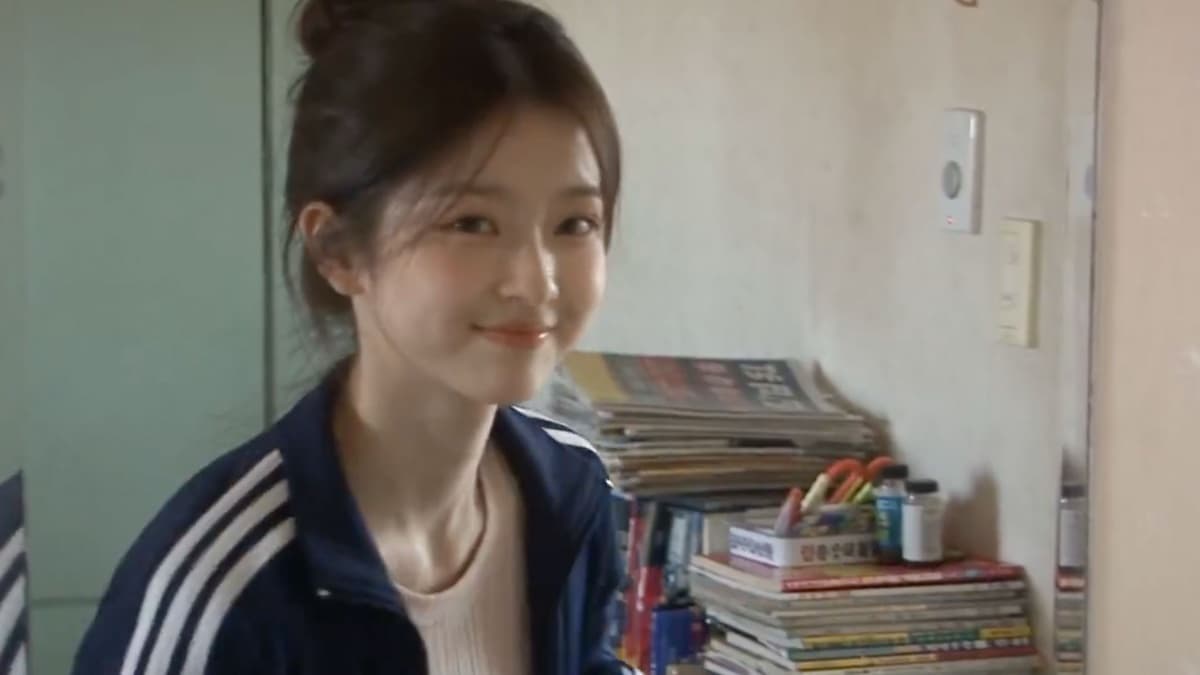
Short answer: name the camera, keep its flaws, ban everything invented after 2004, and ask for ambient sound only. The 'simple day' vlog — a young Korean woman running a small errand through an older Seoul neighborhood, shot like a friend's consumer DV camcorder in about 2003 — is a prompt template, not a remix of anyone's footage. It first appeared in June on Seedance 2.0, where one 15-second version reached 12.9 million views; this week's revival on Seedance 2.5 runs 30 seconds and is at 262,000 views and climbing. Three things make it worth learning even if you never set a clip in Seoul: there's nothing borrowed in it (invented person, no music, no source video), the prompts are public, and the technique — locking an era with camera language and a negative list — transfers to any 'shot on an old camera' look you want.
Where the format comes from
| Date | Post | Model | Views |
|---|---|---|---|
| June 25 | @doctorwasif — Korean woman, early-2000s feel, 15 s | Seedance 2.0 on OpenArt | 61,000 |
| June 30 | @john_my07 — 'a forgotten home video from the early 2000s' | Seedance 2.0 on OpenArt | 12.9 million |
| July 2 | Justine Moore (a16z) — same idea, US high school, 'flickery camcorder' | Seedance 2 | 41,000 |
| Sept 6 | @AIwithkhan — 'Baddie on a Sunday,' first 30-second version | Seedance 2.5 | 615,000 |
| Sept 28–30 | @saniaspeaks_ — campus morning; Korean birthday vlog | Seedance 2.5 | 30,000; 148,000 |
| Oct 2 | @AIwithkhan — 'Baddie on a Simple Day' | Seedance 2.5 | 262,000 |
The June breakout prompt already contained the whole recipe: a main subject, a location, a visual style, then 'Camera Style: Early-2000s consumer DV camcorder aesthetic. Friend casually recording everyday moments. Heavy handheld shake, imperfect framing, frequent autofocus hunting, lens breathing, exposure pumping,' timestamped scenes, and 'Audio: Natural ambient sound only… No music. No sound design. No narration.' Three months later the camera sentence is nearly word-for-word identical across every version — which tells you which part does the work.
The structure every working prompt shares
- 1. The era statement, first line. 'Ultra-realistic early-2000s consumer DV camcorder home video of…' One version adds the rule that matters: 'It must feel like genuine home-video footage, not a modern video with a retro filter.'
- 2. The character, with a reference image. 'Use the attached image as the character reference and keep her face and appearance consistent' — plus the outfit spelled out (pink crop top, white shorts, slippers, a clear water bottle), because the outfit is what drifts.
- 3. The errand, as scenes. Either prose ('She stops at a small street vendor selling sweet corn, buys one and happily takes her first bite while walking') or timestamped — '0–4s GETTING READY… 4–8s MEETING FRIENDS… 8–11s BAKERY.' Seedance 2.5 supports 'precise content editing via timestamps,' per ByteDance, so the timestamped form gives you more control over a 30-second clip.
- 4. The camera block. 'Handheld shake, imperfect framing, autofocus hunting, slight exposure shifts, soft digital detail, mild digital noise, natural motion blur and occasional awkward zooms.'
- 5. The era negatives. 'No smartphones, AirPods, modern cars, LED screens or contemporary interiors.' And the anti-polish list: 'No cinematic stabilization, 4K sharpness, beauty filters, VHS effects or professional filmmaking.'
- 6. Audio, last. 'Natural neighborhood audio only: footsteps, birds, distant traffic, children playing… No music, narration, subtitles.' Higgsfield's own Seedance guide says most working prompts have 'one visual rule at the top, one sound rule at the bottom, and everything in between broken into shots.'
- 7. Continuity. 'Same girl, friends, outfits, hairstyles, handbag and cake throughout. No teleporting, identity drift, outfit changes, disappearing props or reordered actions.'
A template for your own simple day
Create a 30-second ultra-realistic early-2000s consumer DV camcorder home video — it must feel like genuine home-video footage, not a modern video with a retro filter. Use @Image1 as the character reference and keep the face, hair, and outfit consistent: [outfit in one line, including one carried object]. Setting: [a specific older neighborhood, named]. 0–6s: [leaving home / a doorway / a small greeting]. 6–14s: [the errand — a vendor, a shop, a bus stop]. 14–22s: [one small accident or surprise, resolved with a laugh]. 22–30s: [walking home; a look to the camera and one spoken word]. CAMERA: raw consumer DV footage, handheld shake, imperfect framing, autofocus hunting, exposure shifts, soft digital detail, mild CCD noise, motion blur, compression, occasional awkward zooms. ERA: everything authentically [year] — clothing, cars, signs, shopfronts, technology. No smartphones, earbuds, modern cars, LED screens, flat-screen TVs, or modern logos. No stabilization, 4K sharpness, beauty filters, VHS effects, or cinematic camera moves. CONTINUITY: same person, outfit, and carried object throughout; no teleporting or identity drift. AUDIO: natural ambient sound only — footsteps, traffic, voices, wind. No music, narration, or subtitles.
The era lock, and why it transfers
The trick isn't 'retro.' It's naming a specific camera and refusing to clean up after it. A guide to the sibling VHS format puts it well: 'Naming the camera helps more than listing effects. Consumer VHS-C camcorder, 1987 gets you soft low-resolution video, chroma bleed on bright colours, faint tracking noise flickering along the bottom edge…' and 'a stabilised, colour-corrected version instantly reads as a modern clip with a preset on it.' The DV prompts do exactly this — the flaws (autofocus hunting, exposure pumping, awkward zooms) are the point, and the negative list removes the two things that break the spell: modern objects and modern polish. Swap the camera name and the year and the same structure gives you a 1987 VHS Christmas, a 2009 flip-phone video, or a disposable-camera summer.
- Know what you're imitating. MiniDV was the consumer standard from 1995 through the 2000s — 720×480 interlaced, 4:3, soft digital detail, autofocus that hunts. You don't need to prompt the specs; you need to prompt the behavior.
- Run the anachronism checklist on every scene. Phones, earbuds, modern cars, LED signage, flat screens, current logos, modern sneakers. The models default to now; every object you don't ban is a 2026 object waiting to appear.
- Decide on phrasing. These prompts lean on negatives and they work in Seedance; Runway's guidance is the opposite — 'when you write No camera shake, the AI might focus on the word shake.' If a negative keeps producing the thing it bans, restate it positively ('the street is empty of modern cars').
- Skip the date stamp unless you test it. None of the viral prompts asks for a burned-in timestamp, and legible in-video text is still the weakest skill across video models. If you want one, add it in an editor.
- Why Korea, specifically: it isn't arbitrary. South Korea is in a documented 2000s-digicam revival — the Korea Herald on old cameras whose 'low-definition image… gives off retro vibes,' NewJeans' 'Ditto' video shot on camcorder footage — so the look has an audience that recognizes it.
Tools and what it costs
- Seedance 2.5 is the model in every version: 'up to 30 seconds per generation,' up to 30 reference images, timestamp-level control, and audio generated with the video — ByteDance says the model 'minimizes uncontrolled occurrences in subtitles and background music,' which is why 'no music' tends to hold. Ambient-only audio is creator practice, not a documented switch.
- Hosts: Higgsfield, OpenArt, Pollo AI, TapNow, Flova, and Dreamina all offer it; the creators here are partners of several of them. Flova advertises watermark-free export on paid tiers; Higgsfield watermarks free generations and says it 'may embed invisible, machine-readable markers' identifying content as AI on all plans.
- Cost: at Higgsfield's published rates a 15-second 1080p Seedance clip is about $7 in credits, so a 30-second take runs roughly double; the three September videos are 720p. Expect three to five takes before the outfit and face hold for the full 30 seconds.
- One reference image is enough — the October 2 prompt uses exactly one. Generate it yourself with an image model; our Jean Phil guide covers making a character sheet if you want more than one clip of the same person.
Rights and labeling: the short version
This is the cleanest format we've covered. No source clip, no song, no real person, no team logo. What remains is disclosure: label it AI. Meta applies 'AI info' labels when it detects industry-standard markers or when you disclose, TikTok requires labels on realistic AI depictions of people, and YouTube requires disclosure for 'a realistic scene that didn't actually occur' — a photoreal 2003 Seoul street qualifies. The one honesty line worth adding is in the format's own DNA: the June prompt calls it 'a forgotten home video,' and the better captions say so rather than letting viewers believe a tape was found.
Our read
This is the format to learn first, and the one we'd point a beginner at. The viral swaps — Hotel Lobby, the GTA clips, STORM — each carry someone else's performance, music, or trade dress. This one carries nothing but a camera from 2003 and a woman who doesn't exist, and it's done 13 million views across two model generations anyway. The lesson the prompts teach is also the most useful thing in AI video right now: specificity about the instrument beats adjectives about the mood. Say 'consumer DV camcorder, autofocus hunting, no music' and you get a memory; say 'nostalgic, cinematic, beautiful' and you get a commercial. Our AI video ranking covers where Seedance 2.5 sits against Kling and Veo for everything that isn't a found tape.
Where these apps rank